


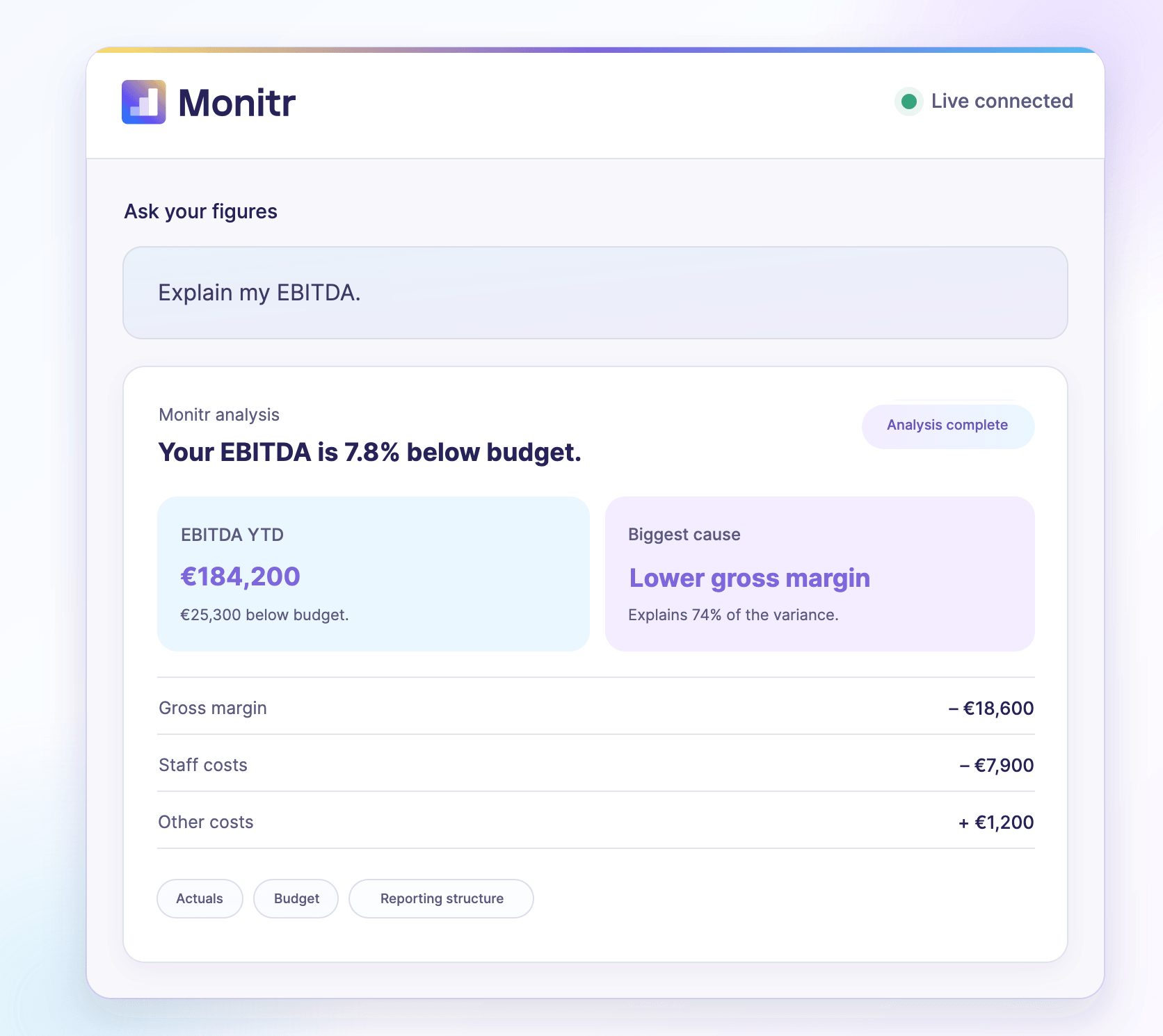


Imagine asking your trusted AI assistant why your EBITDA is off, what an extra hire means for your forecast, or how long your cash buffer lasts if revenue falls.
Not based on an export you first have to download and upload, but based on the up-to-date financial context of your business.
That is the possibility Model Context Protocol, MCP for short, opens up. MCP connects AI assistants to external data sources and tools. As a result, you can ask financial questions where you already work, while Monitr keeps managing the reporting, calculations and scenarios behind them.
For finance, the real value is not just in a smarter AI model. It lies in combining a strong AI assistant with up-to-date, structured and controlled financial context.
MCP makes the connection possible. Monitr gives that connection financial meaning.
In this article
- What is MCP?
- Access to figures is not yet financial context
- Monitr calculates. AI helps you ask and understand.
- What Monitr MCP adds
- Why MCP does not replace the Monitr interface
- From accessible questions to broader AI workflows
- Why control remains a deliberate design choice
What is MCP?
Model Context Protocol is an open standard that lets AI applications consult external data and use tools.
You can think of MCP as a universal connector for AI. Through an MCP server, an application describes which information and actions are available and which parameters they need. A compatible AI assistant can then discover and use those capabilities.
Through MCP, an AI assistant can for example request information from an external system, have a calculation carried out or prepare a proposal for an action. Which information and actions are actually available is determined by the connected application and the access rights that have been set, not by the protocol itself.
Claude, Gemini CLI and Microsoft Copilot Studio, among others, document support for MCP. Which features are available differs by AI environment, subscription and configuration.
So MCP standardises the connection. It does not determine how well the data is structured, how a financial concept is defined or how reliable a calculation is.
Access to figures is not yet financial context
An MCP from an accounting package can give an AI assistant access to invoices, transactions, general ledger accounts and balances. That is valuable, and for some financial questions it is enough.
But a CFO, controller or business owner usually wants to know more than what is on a single account:
- Why is our EBITDA below budget?
- Which department is causing the biggest variance?
- What is the impact of a new employee on profit and cash?
- How does our runway change if revenue falls by twenty per cent?
To answer questions like these, AI also needs the context in which your business interprets its figures: the mapping to reporting lines, the structure of the income statement and cash flow, company-specific KPI definitions, entities and dimensions, budgets, forecasts and scenarios.
A language model can read a journal entry. Without that context, it does not automatically know how your organisation defines gross margin, which forecast scenario is active or how an extra hire feeds through to your cash position.
Monitr calculates. AI helps you ask and understand.
That distinction matters because financial software and generative AI work in fundamentally different ways.
The reports in Monitr are deterministic. When source data, mappings, reporting structure and scenario settings stay the same, the same calculation always produces the same result.
A language model is probabilistic. It formulates a likely answer based on the context it receives. The wording and interpretation can vary. There is also a risk that AI misinterprets information or gives a convincing answer that is not fully supported by the source data.
That is why we do not let AI replace the controlled financial logic.
Monitr: deterministic financial layer
- Structures financial data
- Manages mappings and reporting structures
- Calculates reports and KPIs
- Manages budgets, forecasts and scenarios
- Gives the same result for the same input
AI: probabilistic interaction layer
- Understands questions in natural language
- Finds the relevant information and tools
- Summarises results and helps explain them
- Translates a question into a proposal
- Can phrase an answer in different ways
AI helps you read, query and structure financial information. Monitr makes sure it is processed correctly, repeatably and in a controlled way.
So the AI assistant does not have to reconstruct EBITDA itself from individual transactions. The assistant requests the controlled result from Monitr and then helps investigate and explain the variance.
Turning data into reports, managing reporting structures and calculating scenarios remain part of the existing Monitr functionality. MCP makes that functionality accessible from other environments; it does not build a second financial truth alongside it.
What Monitr MCP adds
Monitr connects accounting data, financial reporting, budgets and forecasts in one financial model. The data is not only retrieved, but also mapped, structured and placed in the right business context.
As a result, an AI assistant can go further than retrieving a balance.
For the question “Explain my EBITDA”, Monitr can provide the result, the comparison with budget and the relevant underlying reporting lines. AI helps summarise the main variances in a way that is easy to understand.
For “Add an extra sales executive to my forecast”, AI can translate the question into a proposal with a start date and cost assumptions. Monitr remains the place where the scenario is managed and the impact on profit and cash is calculated.
For “How long does my cash balance last if I sell half as much?”, Monitr can calculate a scenario based on the opening balance, forecast and existing cost structure. AI helps explain the outcome and the assumptions used.
Monitr MCP has currently been announced as coming soon. The first release focuses on making financial context and analyses accessible from compatible AI assistants. The exact availability of write actions, external workflow integrations and supported AI environments will be documented at release.
MCP does not replace the Monitr interface
A chat window is handy for asking a financial question in plain language. It is not the best working environment for every financial task.
The Monitr interface remains the right place to:
- build and check reporting structures;
- map general ledger accounts correctly;
- manage budgets and forecasts in detail;
- compare scenarios side by side;
- click through to the underlying financial data;
- review assumptions, changes and results.
MCP adds an extra point of access. A controller can keep working directly in Monitr for in-depth analysis, while a CEO or sales manager asks a financial question from a trusted AI assistant.
That does not make Monitr a superfluous extra layer. It is precisely the layer that stops every AI assistant from having to reconstruct reporting logic, mappings and scenarios itself. One controlled financial model can serve multiple interfaces and workflows.
From accessible questions to broader AI workflows
Not everyone in an organisation works in a financial platform every day. Through a trusted AI assistant, more people can ask financial questions in plain language, without having to know the underlying logic.
A sales manager can ask how the team is performing against budget. An operations lead can investigate the impact of a delayed project. A business owner can look at which decision has the biggest influence on the future cash position.
Over time, MCP also makes it easier to fit Monitr into broader AI workflows. Think of figures from an unconnected operational system that are first checked and then translated into a proposal for a forecast scenario in Monitr.
Such a workflow could, for example, retrieve data, validate the fields and periods, show proposed mappings and have Monitr calculate the impact. A user then reviews the assumptions before a change is applied.
Two practical examples
Splitting staff costs analytically based on payroll reports
Suppose the payroll entries from your accounting package only contain a total amount, while you want to analyse staff costs by department in Monitr. You load the payroll report into your AI assistant and ask:
“Split the staff costs by department and prepare the adjusting entries in Monitr.”
The AI assistant reads the payroll report, recognises employees and cost components and links them to the available analytical dimensions. Uncertain or missing department information is flagged. The workflow then checks whether the split amounts reconcile with the payroll report total. After that, the proposed entries appear for review.
Only after a user has checked the period, mappings and totals are the adjusting entries processed in Monitr. That way, AI makes unstructured information usable, while Monitr safeguards the analytical structure and financial control.
Including a loan agreement in your forecast
A loan agreement contains more than one amount. A correct forecast needs, among other things, the principal, drawdown date, term, interest rate, repayments, fees and any repayment holiday.
You load the PDF of the agreement into your AI assistant and ask:
“Include this loan agreement in my forecast and show the impact on profit, balance sheet and cash flow.”
The AI assistant extracts the relevant terms from the document and first presents them as assumptions you can check, with a reference to where in the agreement they come from. After confirmation, the workflow translates that information into a proposal for the interest and repayment schedule in Monitr.
Monitr then calculates the impact per period: the receipt of the loan, the repayments, the interest charges, the outstanding debt and the movements in cash. Missing or conflicting terms are not filled in by guesswork, but put to the user for confirmation.
In both examples, AI acts as a bridge between a document and the financial model. The assistant helps read and structure information; Monitr manages the entries, forecast logic and reproducible calculations.
These workflow examples describe the direction in which MCP can evolve, not necessarily the full scope of the first release. The principle stays the same, though: AI helps connect systems and intentions; Monitr safeguards the financial structure and calculation.
Control remains a design choice
MCP makes a connection possible, but it does not automatically make that connection secure or responsible. For financial applications, it must be clear who gets access, which data becomes available, which tools may be used and when human confirmation is needed.
That is why the MCP standard starts from principles such as explicit consent, control over data access and clear authorisation for actions. The actual security then depends on both the MCP server and the chosen AI environment.
For Monitr, this means the financial context must stay controlled, and that reading, analysing, simulating and applying must not be treated as one invisible step. An answer must be traceable to the underlying data, and a proposed change must be visible before it is processed.
The final documentation at release will therefore need to clarify:
- how users authenticate and which Monitr rights apply;
- which data is shared with the chosen AI environment;
- which functions are read-only and which can prepare or carry out changes;
- where human confirmation is required;
- how access and actions carried out are monitored.
That is also our broader vision of AI in finance. The future will not be decided by the chatbot with the nicest answer, but by the quality of the data, structure and control underneath that answer.
AI does not replace the CFO, controller or accountant. It does shorten the distance between a financial question, the relevant figures and a well-founded decision. MCP brings that context to the environment where the question arises. Monitr makes sure the financial truth behind it stays consistent.
Turn your figures into a conversation
Monitr MCP makes your financial model accessible to compatible AI assistants, without replacing the Monitr interface or your existing financial processes.
Want to find out how your organisation can make up-to-date reporting, forecasts and scenarios available to AI?


Pieterjan van Dam


